Experiment Overview
This site provides an overview of user studies conducted with Informfully. The entire platform is organized around experiments. Participants get access to the app by being assigned to a given experiment/research project.
Depending on the group a participant is assigned to, the app can present them with unique, group-specific content. This content (text, video, and audio) can be freely accessed and rated by the user. Once an experiment is launched, it will follow the typical experimentation cycle described below.
INFO
Please see the Experiment Setup for a tutorial on completing the project setup and launching a user experiment.
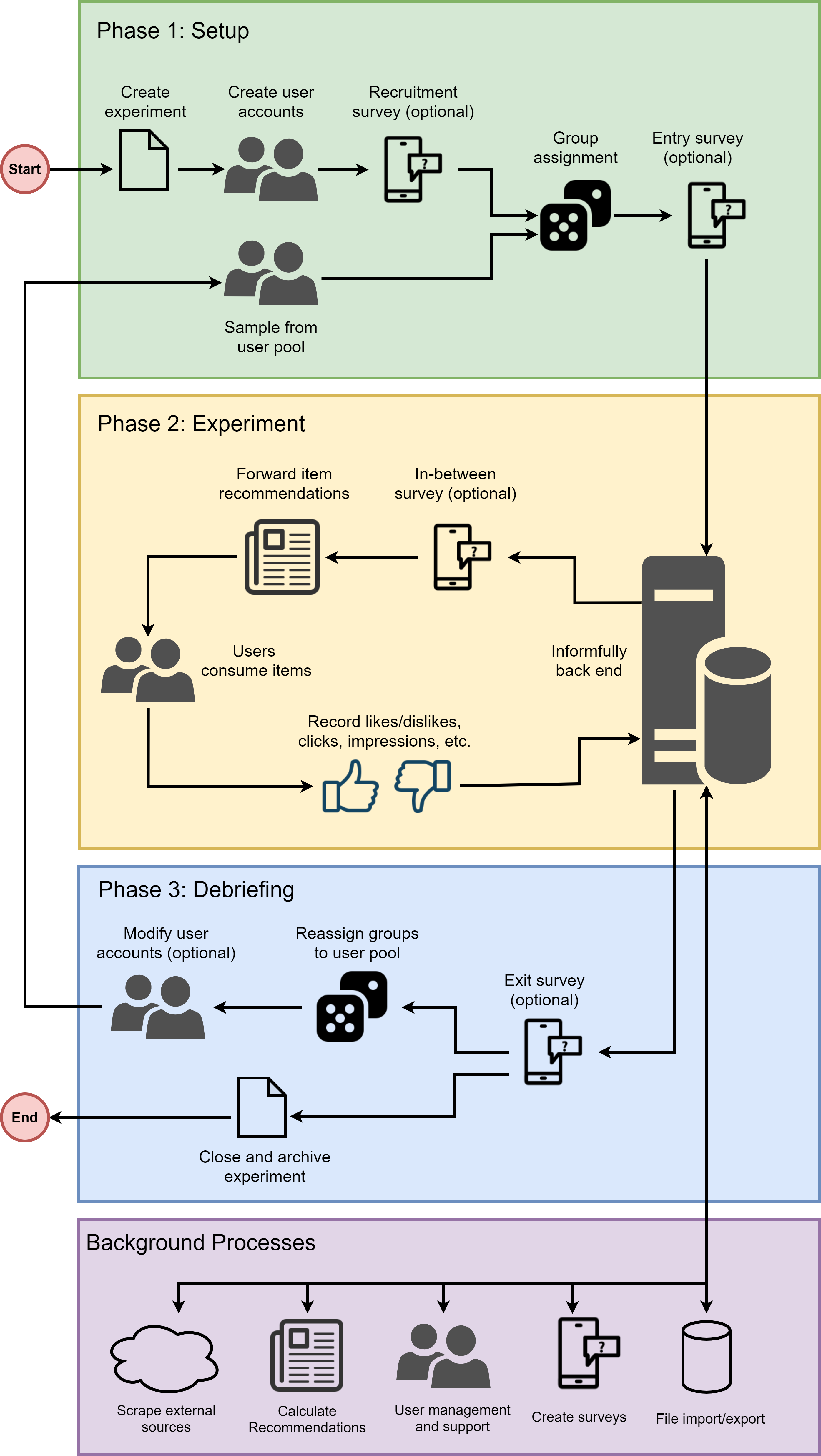
Phase 1 - Enrollment Phase
Participants download the app from the respective storefronts (Android or iOS). Once the app is installed, users sign in using either experiment-specific credentials provided to them or create a new account. User credentials/accounts can be generated in batches when setting up an experiment.
In a subsequent step, users can be prompted to complete an intake survey to create a detailed user profile. (Please note that this is an optional step.) The intake survey is not restricted to any specific question type. Additional surveys can be displayed at any point in time. They can be made mandatory, so a user must answer all the questions before they can continue using the app. The answers to each survey will be stored separately. (See User Surveys for further details.)
All survey responses will be automatically stored in the database under the corresponding experiment for each user. There is no restriction on how many surveys a user is required/able to take at any given moment. Furthermore, it is possible to run a script on the server that takes an individual's or an entire group's survey answers as input to calculate additional user profile values (e.g., political scores), which are automatically added to the database.
Once user accounts are created, they can be separated into specific user groups. Each user must be part of exactly one group (and exactly one experiment) at each point in time. Access to the app can be enabled or revoked instantly via this group membership, and temporal restrictions can also be applied.
Phase 2 - Experiment Phase
Once users are assigned to their respective groups, they can be presented with content tailored to their specific group. This content can be text, video, or audio. All content is stored in a schema-free MongoDB instance. Content can be copied into the database before the experiment begins or added to/expanded at any time. In the sample above, we see how a cron job regularly scrapes online websites to add new items to the central database for recommendation purposes.
Assigning content to participants in the groups of an experiment can be done simultaneously (everyone receives the content at the same time) or staggered (groups receive content one after the other, or in any custom fashion controlled via a script). The example above shows one possible three-step process for a stacked content assignment pipeline. News articles are used as an example, but the content of the item can be any kind of text, video, or audio.
In the example shown, the first step is for the baseline group to read and rate news articles. In a second step, the server-based recommender system calculates two distinct item recommendations for the next two groups. The third and final step involves pushing these items into the news feeds of the subsequent two groups, and then recording all their interaction metrics again.
Upon closer examination of the pipeline, the app provides the option to assign content statically or dynamically. A static fashion would be one in which the researchers define beforehand the exact items a user sees. Dynamic fashion means there is a script that calculates item recommendations.
Phase 3 - Debriefing Phase
Each experiment session should end with a debriefing survey. The debriefing survey can be combined with an event trigger that automatically blocks further app access, or access can be revoked at a specific time in the future.
After the experiment is completed, any recorded data points can be exported as either CSV or JSON. Since the app uses MongoDB for its database, it is also possible to export or create a separate instance with copies of all collections/documents for further analysis and evaluation.
There are two ways to deactivate/close an experiment. First, you can move all user accounts from the experiment in question into a separate userArchive collection. By doing so, your experiment participants will no longer be able to access the app. This is the preferred option if there are no plans for the panelists to participate in subsequent experiments. Second, you can create a lockout survey. This is a survey without any questions/buttons, but a text that informs participants about the end of the survey. Such a survey presents a screen overlay that cannot be closed, effectively locking participants out of the app. This is the preferred option in case panelists participate in subsequent experiments, as it is a temporary solution that can be easily undone.