Researcher Data API
Researchers running studies need programmatic access to the behavioral data their experiments produce — reading article views, page views, sign-ins, and so on — and they need to upload content such as news articles and recommendation lists from their own pipelines. Giving researchers direct database access is neither safe nor scoped, so this is exposed through a separate service instead: a Python FastAPI app (fastapi_app/) that shares the platform's MongoDB with the Meteor backend.
It runs as its own container (fastapi) in the Docker Compose stack — see Docker Setup — on port 8000.
Authentication Bridge
The API does not manage its own accounts; it reuses the platform's Meteor account system through a signed-token bridge:
- A logged-in Meteor user who holds the
adminormaintainerrole calls theapiAuth.issueTokenmethod (see Meteor Methods). - Meteor signs a JWT (HS256) containing the user's id (
sub) and roles, with a fixed issuer/audience and a 10-minute default lifetime (configurable viaAPI_JWT_TTL_SECONDS). - The client sends that token to the FastAPI service as a standard
Authorization: Bearer <token>header. - FastAPI validates it (
app/auth.py) using the same shared secret, passed to both containers via theAPI_JWT_SECRETenvironment variable.
The two services never talk to each other directly — the only contract between them is the signed token — which keeps the API stateless and avoids duplicating account management in Python. Every protected route requires the token to carry the admin or maintainer role; the POST /articles route additionally requires maintainer specifically.
Ownership Enforcement
Every data route first resolves which experiments the calling researcher owns (app/ownership.py, reading the experiments array on their users document) and refuses access to anything outside that set (require_experiment_ownership, HTTP 403). Uploading recommendations additionally checks that every referenced participant (userID) actually belongs to the target experiment, which prevents a researcher from writing data against another study's participants or probing for valid user ids.
Routes
All routes below (except /health, /ui/stats, and the code-exchange endpoints) require a valid bearer token.
| Method | Path | Description |
|---|---|---|
| GET | /health | Unauthenticated health check. |
| GET | /experiments | List experiments owned by the caller. |
| GET | /experiments/{experiment_id} | Read one owned experiment. |
| POST | /articles | Bulk-insert news articles (maintainer role required). |
| POST | /experiments/{experiment_id}/recommendations | Upload JREX-structured recommendations; validates every userID belongs to the experiment. |
| GET | /experiments/{experiment_id}/recommendations | List recommendations for an experiment's participants. |
| POST | /experiments/{experiment_id}/articles | Upload an experiment-scoped document into the articles collection. |
| GET | /experiments/{experiment_id}/articles | List that experiment's articles documents. |
| POST | /experiments/{experiment_id}/test-artifacts | Upload into the fastapiTestArtifacts collection (a scratch/example collection for testing the upload flow). |
| GET | /experiments/{experiment_id}/test-artifacts | List that experiment's test artifacts. |
| GET | /experiments/{experiment_id}/user-behavior/{collection} | Generic behavioral-data read for any allowlisted collection (see below). |
| GET | /experiments/{experiment_id}/stats | Per-collection document counts for an experiment, across all allowlisted collections. |
| POST | /auth/code | Exchange a valid bearer token for a single-use, 30-second UI code (see Data Explorer below). |
| POST | /auth/exchange | Exchange a UI code back for the JWT (single-use; deleted on use or expiry). |
| GET | /ui/stats | Serves the Data Explorer's HTML page. |
Interactive OpenAPI docs are available at /docs (Swagger UI) and /redoc, auto-generated by FastAPI from the route definitions above — useful for exact request/response schemas beyond this table.
GET /experiments/{experiment_id}/user-behavior/{collection} (and the Data Explorer built on top of it) has no pagination, date range, or other filtering — each call returns the entire result set for the experiment in one response. Expect slow responses when pulling a large collection from a long-running study.
Exposing a New Collection (for Future Teams)
The service keeps an explicit allowlist of queryable collections in fastapi_app/app/main.py, split by how they're scoped:
- User-scoped (
USER_SCOPED_COLLECTIONS) — documents keyed byuserId; the API resolves the experiment's participant list and queriesuserId $in [...]. Currently:articleViews,articleViewsUpgrade,pageViews,pageViewsUpgrade,signins,signInUpgrade,explanations,explanationViews,podcastAnalytics,videoAnalytics,wrappedReports. - Experiment-scoped (
EXPERIMENT_SCOPED_COLLECTIONS) — documents keyed directly byexperimentId. Currently:scheduledEvents,recurringSchedules.
To make a new collection queryable, add its name to the matching set. The generic /user-behavior/{collection} route, the /stats counts endpoint, and (per the report) the Data Explorer and export-all feature all pick it up automatically — no new endpoint code required. The only requirement is that the collection consistently carries either a userId or an experimentId field.
Data Explorer
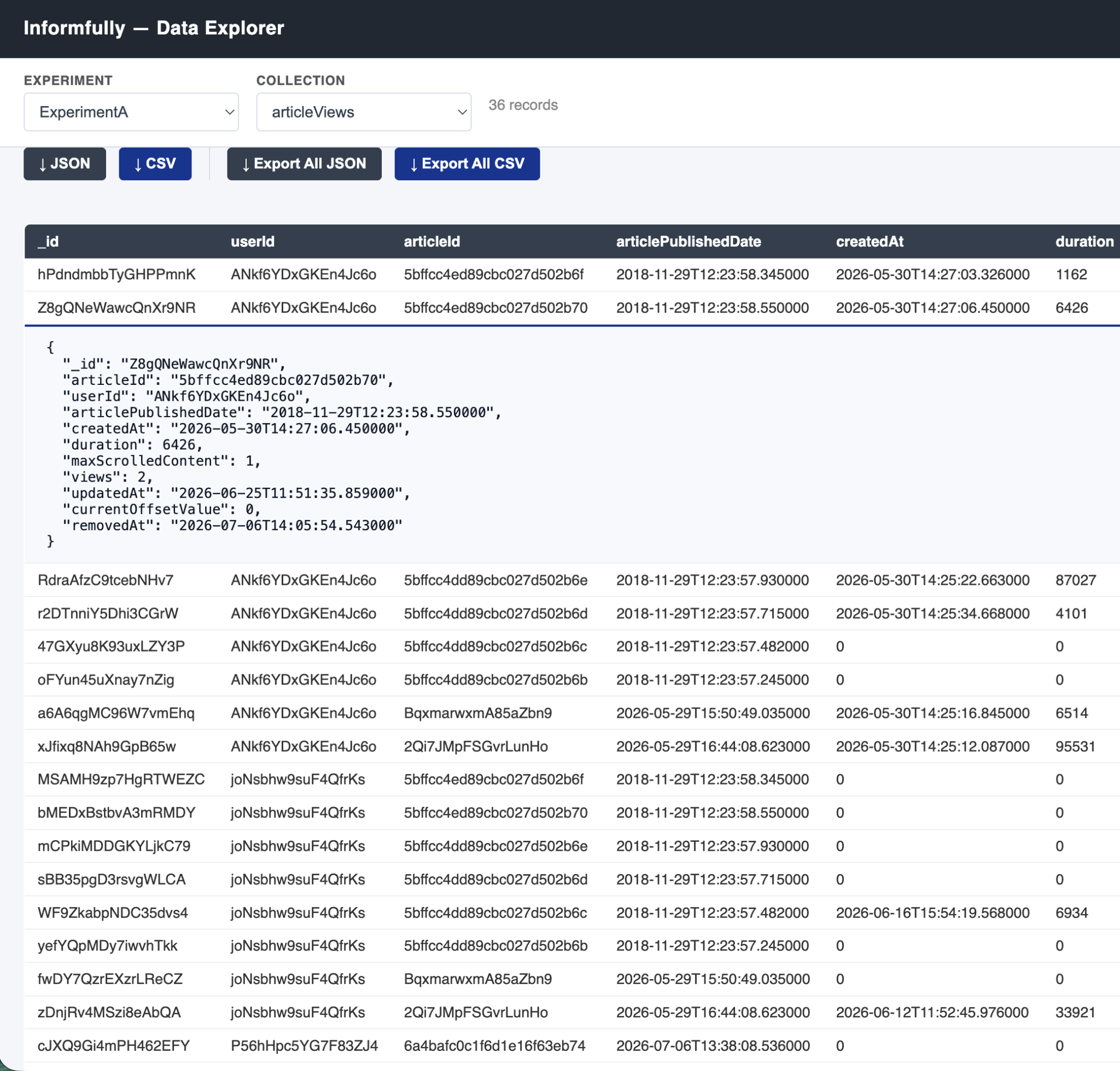
A single-page UI (served at GET /ui/stats, fastapi_app/app/stats_ui.html) lets a researcher inspect an experiment's collected data without leaving the browser. To keep the JWT out of places it shouldn't be logged (URLs, browser history), the link-through uses a one-time code:
- The client already holds a valid JWT and calls
POST /auth/code(Bearer-authenticated) to get back a random, single-usecodevalid for 30 seconds. - It opens the explorer with only that code in the URL.
- The explorer immediately calls
POST /auth/exchangewith the code, gets the JWT back, and discards the code (server-side, it's deleted from the in-memory store on first use or once expired). - From then on, the JWT travels in the
Authorizationheader rather than the URL.
Once authenticated, the explorer lets a researcher pick an owned experiment, see per-collection document counts (GET /experiments/{id}/stats), browse a collection's rows in a table with any cell openable as full JSON, and export data as JSON or CSV — either a single collection (btn-csv/btn-json in stats_ui.html) or every allowlisted collection at once (Export All JSON/Export All CSV).